Course Management

Course Management Overview
The Course section allows administrators to manage the academic structure and configure how courses are delivered within the system. This includes defining academic timelines, creating courses, organizing disciplines, and managing student participation in course sessions.
This section supports the full lifecycle of course setup—from high-level academic years and terms to detailed session scheduling and discipline mapping.
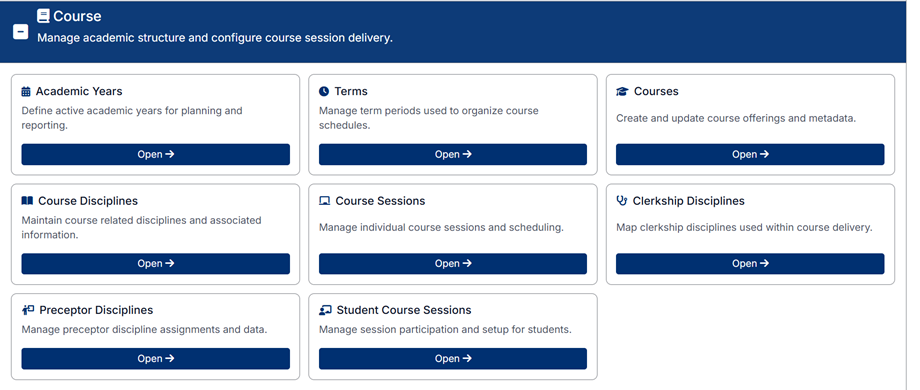
Accessing Course Management
To access the Course section:
- From the left-hand navigation menu, select Course
You will see a dashboard of available course management areas.
Course Management Areas
The Course section is divided into the following components:
Academic Years
Define and manage academic years used for planning, scheduling, and reporting.
Terms
Create and manage term periods (e.g., semesters or blocks) that organize course schedules within an academic year.
Courses
Create and maintain course offerings, including course details and metadata.
Course Disciplines
Define and manage disciplines associated with courses.
Course Sessions
Manage individual course sessions, including scheduling, dates, and associated details.
Clerkship Director Disciplines
Map clinical disciplines to clerkships within course delivery.
Preceptor Disciplines
Assign and manage which disciplines are associated with preceptors for course delivery.
Student Course Sessions
Manage student participation in course sessions, including enrollment and tracking.
Understanding Relationships in Course Management
The Course module is highly structured, with each component building on the others:
- Academic Years contain one or more Terms
- Terms organize Course Sessions
- Courses define the core academic offering
- Course Sessions represent scheduled instances of a course
- Course Disciplines link courses to clinical or academic disciplines
- Clerkship and Preceptor Disciplines define how disciplines are applied within teaching and supervision
- Student Course Sessions link students to specific course sessions
This structured approach ensures consistency in scheduling, delivery, and reporting across the academic program.
How Course Data Is Used
The information configured in this section is used throughout the system to:
- Organize academic schedules and timelines
- Define course offerings and structure
- Assign students to sessions
- Link disciplines to courses and clinical experiences
- Support reporting and academic tracking
Important Notes
- Changes made in this section may impact scheduling, student assignments, and reporting
- Relationships between entities (e.g., courses, terms, sessions) must be configured correctly for the system to function as expected
- It is recommended to configure Academic Years and Terms first, followed by Courses and Sessions
Proper setup of the Course module ensures a well-structured and manageable academic environment within the system.
Created with the Personal Edition of HelpNDoc: Produce electronic books easily