Manage Skills

Clinical Skills Management
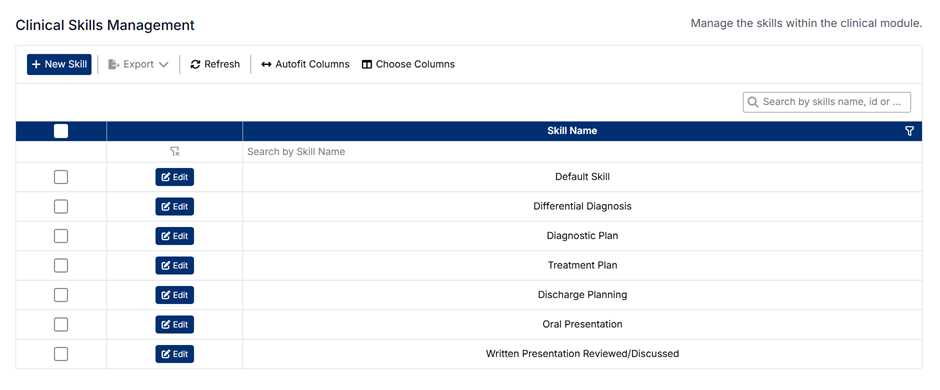
The Clinical Skills Management screen allows administrators to define and maintain the skills used within the clinical module. These skills represent the competencies students are expected to demonstrate and may be evaluated against during clinical training.
Unlike some other areas in the Clinical section, skills are not linked to a specific discipline. They are maintained as a shared reference list and can be used across the clinical module.
Accessing Clinical Skills
To access the Clinical Skills Management screen:
- From the left-hand navigation menu, expand Clinical
- Select Skills
The screen displays a list of all clinical skills currently available in the system.
Understanding the Screen
- Skills are displayed in a single list
- The toolbar includes actions such as New Skill, Export, Refresh, and column settings
- The search bar can be used to locate a specific skill
- Each skill can be edited directly from the list
Because skills are not linked to a discipline, they are managed as a global list for the clinical module.
How Clinical Skills Are Used
Clinical skills are used to support student evaluation and performance tracking across the system.
Examples of skills may include:
- Differential Diagnosis
- Diagnostic Plan
- Treatment Plan
- Discharge Planning
- Oral Presentation
These values may be used in assessments, evaluations, and reporting to measure student competency.
Creating a New Skill
To create a new skill:
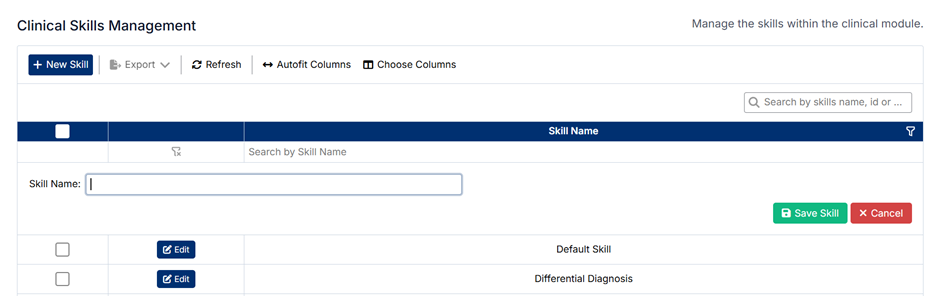
- Click + New Skill
- Enter the Skill Name
- Click Save Skill
The new skill will be added to the list.
Editing an Existing Skill
To edit a skill:
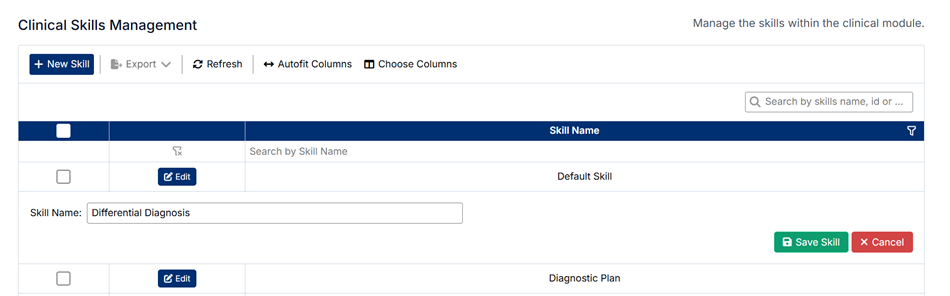
- Locate the skill in the list
- Click Edit
- Update the Skill Name
- Click Save Skill
Changes will be applied immediately and reflected wherever the skill is used.
Deleting Skills
⚠️ Skills cannot be deleted.
This restriction ensures data integrity, as skills may be linked to:
- Existing assessments and evaluations
- Historical performance data
- Reporting and analytics
If a skill is no longer required, it is recommended to:
- Leave it unused going forward
- Or update its name if appropriate
Important Notes
- Clinical skills are shared across the clinical module and are not tied to a discipline
- Changes to skills may impact evaluation workflows, reporting, and historical records
- Ensure skill names are clear and consistently defined so they can be used accurately across the system
Proper management of clinical skills supports consistent assessment of student competency across all clinical areas.
Created with the Personal Edition of HelpNDoc: iPhone web sites made easy