Manage Genders

Genders Management
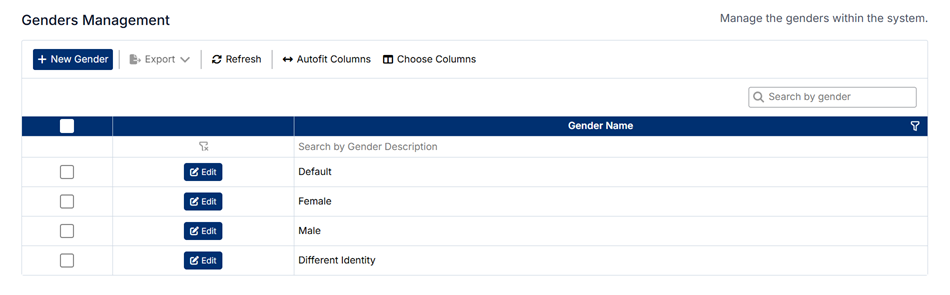
The Genders Management page allows administrators to define and maintain gender values used throughout the system. These values are applied in demographic data capture and reporting to ensure consistent and inclusive classification.
Accessing Genders Management
To access this page:
- Navigate to General from the left-hand menu
- Select Genders
Understanding the Genders List
The Genders Management screen displays all configured gender values.
Key columns include:
- Gender Name – The defined gender value (e.g., Female, Male, Different Identity)
- Edit – Allows you to modify an existing gender
You can also:
- Use the search bar to find specific gender values
- Apply filters to refine the list
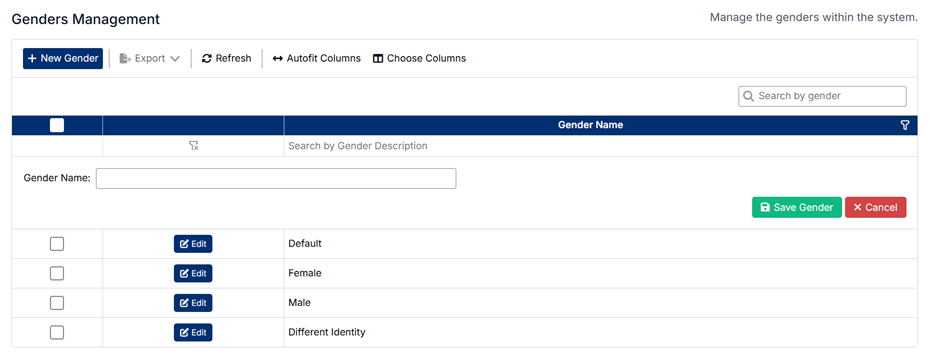
Creating a New Gender
To create a new gender:
- Click + New Gender
- Enter the Gender Name
- Save the record
Editing a Gender
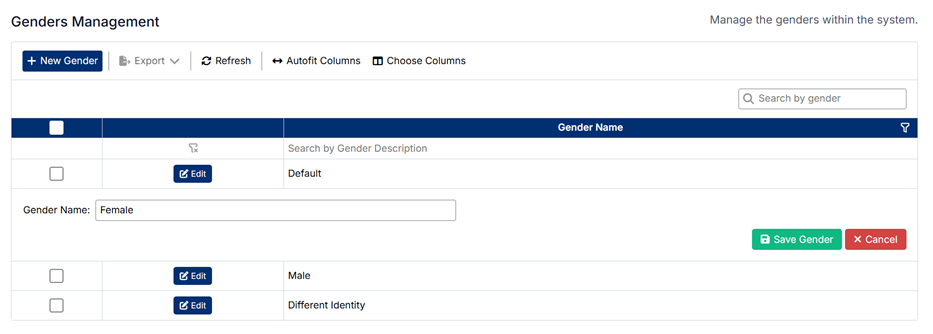
To update an existing gender:
- Click Edit next to the relevant record
- Modify the Gender Name
- Save your changes
How Gender Values Are Used
Gender values configured here are used across the system, including:
- Patient and User Demographics – Capturing gender information
- Clinical Data Entry – Supporting structured demographic input
- Reporting and Analytics – Enabling analysis by gender
Important Notes
- Gender values are global reference values and apply across all modules
- Updates may impact existing records and reports
- Ensure values are inclusive, consistent, and aligned with institutional standards
- Avoid duplicate or overlapping entries to maintain data integrity
Proper configuration of gender values ensures accurate, respectful, and consistent demographic data across the application.
Created with the Personal Edition of HelpNDoc: Protect Your Confidential PDFs with These Simple Security Measures